Support MyOwn Telco
Docs» phones» phones:how-do-i-install-zoiper-on-mobile

How do I install Zoiper on mobile?


To configure Zoiper on your mobile phone, simply execute the following steps;

Step 1 – Click on the Providers list button:
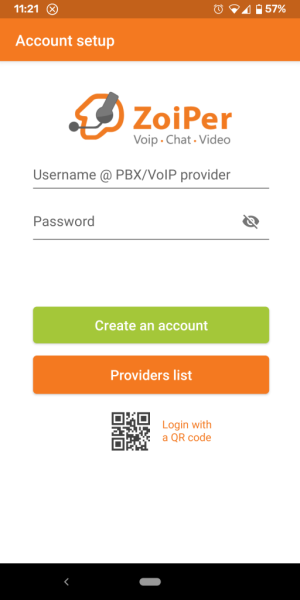
Zoiper - Account setup

Step 2 – Select MyOwn Telco from the providers list:
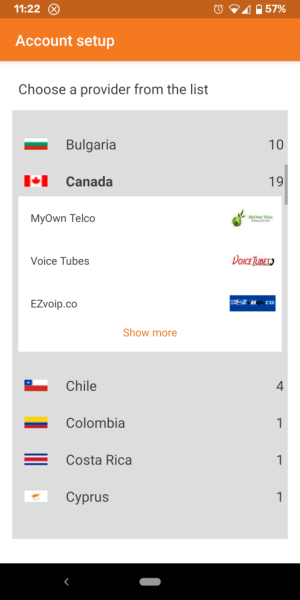
Zoiper - Selecting MyOwn Telco as the provider

Step 3 – Click on the Get configuration button:
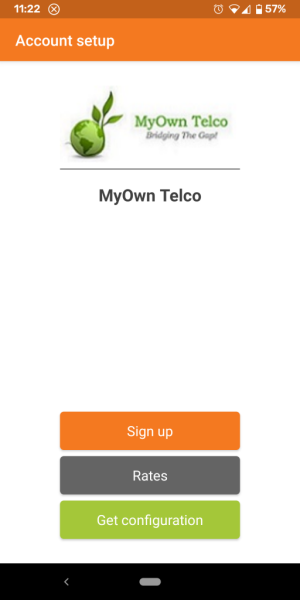
Zoiper - Getting automatic configuration

Step 4 – Provide your 6-digit username and password:
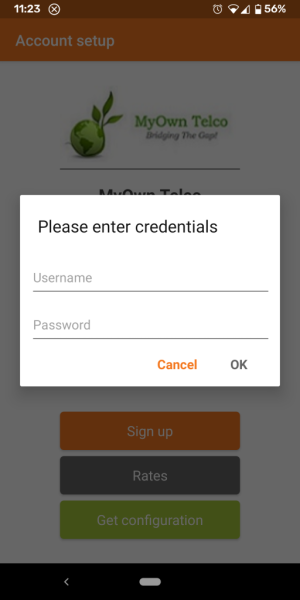
Zoiper - Providing credentials information

Step 5 – On the final screens, grant Zoiper the necessary permissions and allow it to run in the background for optimal performance.

Previous Next

Support MyOwn Telco


-> :
  • English (en)
  • Français (fr)


Table of Contents

ARTICLE CATEGORIES

  • Billing
  • Features and Settings
  • Number Porting
  • Phones
  • Reselling
  • Servatus
  • Support